"We'll build it ourselves." For decades, this meant hiring developers, writing code, and waiting months for automation that business users could have designed in days—if only they had the tools.
Low-code automation platforms changed this equation. Business analysts, process owners, and operations teams now build sophisticated workflows without traditional coding. The results: automation projects that used to take 6 months now launch in 6 weeks, at a fraction of the cost, built by people who actually understand the business process.
The most successful automation programs aren't built entirely by IT departments or entirely by business users—they're built through collaboration enabled by low-code platforms that both sides can use.
The Citizen Developer Revolution
A "citizen developer" is a business user who builds applications and automation using low-code tools, without formal programming training. This isn't a new concept—Excel power users have been citizen developers for decades. What's new is the sophistication of what they can build.

Organizations with mature citizen developer programs build automation 3-5x faster than traditional IT-led initiatives
Modern low-code platforms enable citizen developers to:
- Build multi-step workflows with conditional logic and approvals
- Integrate with dozens of systems without writing API code
- Create user interfaces for data entry and display
- Automate document generation and processing
- Build dashboards and reports from multiple data sources
A manufacturing company trained 12 business users on a low-code platform. Within six months, they built 47 automation workflows addressing pain points across operations, quality, and planning. Total development cost: $65,000. Equivalent cost using traditional development: $380,000, with 18-month timeline.
What Makes Low-Code Different
Low-code platforms aren't just "easier programming." They represent a fundamentally different approach to building automation:
Visual Development Instead of Coding
Drag-and-drop interfaces replace text-based coding. Users design workflows visually, seeing the process flow as they build it. This makes automation accessible to people who understand business processes but not programming languages.
Pre-Built Components and Connectors
Instead of writing integration code for each system, low-code platforms provide pre-built connectors for common applications (Salesforce, SAP, Microsoft 365, etc.). Need to read data from your CRM and update your ERP? That's configuration, not coding.
Built-In Best Practices
Error handling, logging, security, and scalability are built into the platform. Citizen developers get enterprise-grade capabilities without having to understand the underlying complexity.
Rapid Iteration and Deployment
Changes that would require code review, testing, and deployment cycles in traditional development can be tested and deployed in minutes with low-code platforms. This enables true agile automation development.
The Low-Code Platform Landscape
Different platforms serve different needs. Understanding the landscape helps you choose appropriately:
Integration Platforms (iPaaS)
Tools like Zapier, Make (Integromat), and Workato focus on connecting cloud applications. Perfect for:
- Moving data between SaaS applications
- Triggering workflows based on events in one system
- Synchronizing records across multiple platforms
- Building lightweight automation without infrastructure
Strengths: Extremely easy to use, hundreds of pre-built connectors, quick wins
Limitations: May struggle with complex logic, limited control over error handling
RPA Platforms with Low-Code
Platforms like UiPath, Power Automate, and Automation Anywhere for desktop automation. Ideal for:
- Automating tasks in legacy systems without APIs
- Desktop automation (screen scraping, keyboard/mouse control)
- Attended automation (bots assisting humans)
- Process mining and discovery
Strengths: Works with any application, even without APIs
Limitations: More fragile than API-based integration, requires more maintenance
Business Process Management (BPM) Suites
Platforms like Appian, Pega, and Camunda for complex process orchestration. Best for:
- Multi-step workflows with approvals and exceptions
- Case management (customer onboarding, claims processing)
- Human-in-the-loop workflows
- Complex business rules and decision logic
Strengths: Handle complex processes, built-in governance, enterprise scalability
Limitations: Steeper learning curve, higher cost, potentially over-engineered for
simple
needs
Low-Code Application Builders
Platforms like OutSystems, Mendix, and Microsoft Power Platform for building custom applications. Useful for:
- Creating custom UIs for data entry and display
- Building mobile applications
- Developing departmental applications quickly
- Prototyping before investing in custom development
Strengths: Create complete applications, not just workflows
Limitations: More complex than pure automation platforms, require more planning
Building a Citizen Developer Program
Simply buying a low-code platform doesn't create capability. Successful organizations build structured citizen developer programs:
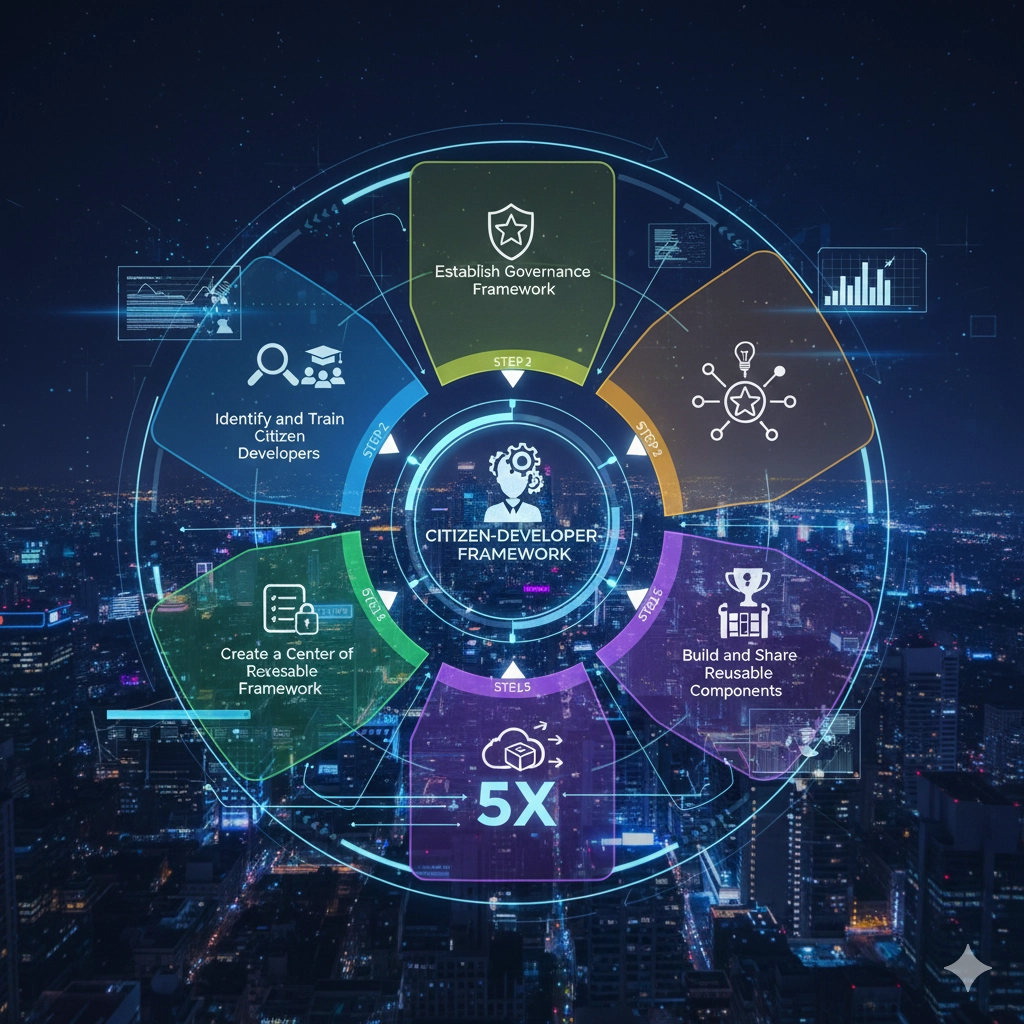
A structured approach balances empowerment with governance
Step 1: Identify and Train Citizen Developers
Look for business users who:
- Understand their business processes deeply
- Have aptitude for logical thinking and problem-solving
- Are currently creating workarounds (complex Excel macros, manual procedures)
- Have credibility with their peers
Provide structured training: platform fundamentals, best practices, governance requirements, and ongoing mentorship. A cohort-based approach works well—train groups of 8-12 together so they can learn from each other.
Step 2: Establish Governance Framework
Empowerment without governance creates chaos. Define clear boundaries:
- What can citizen developers build? Process automation, simple apps, departmental workflows
- What requires IT involvement? Enterprise-wide systems, customer-facing applications, integrations with critical financial systems
- Review and approval process: When does automation need IT review before production deployment?
- Security and compliance: Standards for data handling, access control, audit trails
🎯 The Three-Tier Model
Tier 1: Citizen developers build freely, deploy to their team (personal/team
automation)
Tier 2: Requires peer review, can deploy departmentally
Tier 3: Requires IT review, enterprise deployment
Step 3: Create a Center of Excellence
Establish a small team (even 1-2 people initially) to:
- Provide guidance and mentorship to citizen developers
- Review and approve Tier 2 and Tier 3 automation
- Maintain component library and templates
- Share best practices and success stories
- Track metrics and demonstrate value
Step 4: Build and Share Reusable Components
Create a library of pre-built components:
- Common integrations (pulling data from specific systems)
- Standard workflows (approval processes, notification templates)
- Utility functions (date calculations, data transformations)
- UI templates for consistency
This accelerates development and ensures quality—citizen developers build on proven foundations rather than reinventing wheels.
Step 5: Measure and Celebrate Success
Track and communicate wins:
- Number of automation workflows deployed
- Time/cost saved through automation
- Speed of deployment compared to traditional development
- Employee satisfaction improvements
Recognize successful citizen developers. Share their solutions with the broader organization. This builds momentum and encourages others to participate.
Real-World Implementation Example
A financial services company with 1,200 employees implemented a citizen developer program:
Month 1-2: Foundation
- Selected Power Automate as the platform (already had Microsoft 365 licensing)
- Identified 15 potential citizen developers across departments
- Established governance framework and review process
Month 3-4: Training and Pilot
- Conducted 2-day training workshop for the cohort
- Each participant built 2-3 simple automations for their team
- IT reviewed and provided feedback
Month 5-12: Expansion
- Citizen developers built 43 automation workflows
- Created component library with 12 reusable connectors
- Trained second cohort of 12 citizen developers
Results After 12 Months:
- 62 automation workflows in production
- Estimated 2,400 hours/month saved across the organization
- $340,000 in measurable cost avoidance
- Average deployment time: 3 weeks (vs. 4-6 months for IT-led projects)
- Employee satisfaction in automated processes up 45%
Common Pitfalls and How to Avoid Them
⚠️ Citizen Developer Program Risks
- Shadow IT at scale: Without governance, you get hundreds of undocumented, unsupported automation workflows
- Security gaps: Citizen developers may not understand security implications of data access and sharing
- Technical debt: Poorly designed automation that becomes unmaintainable
- Over-confidence: Citizen developers attempt to build solutions beyond their capability
- Lack of documentation: Automation built and understood by one person becomes a risk when they leave
Mitigation Strategies:
- Mandatory documentation: No deployment without documented purpose, process flow, and maintenance plan
- Automated monitoring: Track which automation is running, who built it, when it last succeeded/failed
- Regular reviews: Quarterly audits of citizen-developed automation for security and efficiency
- Clear escalation: When complexity exceeds citizen developer capability, engage IT proactively
- Knowledge transfer: Pair citizen developers so knowledge isn't siloed with individuals
When Low-Code Isn't the Answer
Low-code platforms are powerful, but they're not appropriate for every situation. Use traditional development when:
- Performance is critical: High-transaction systems may need optimized code
- Complex algorithms required: Advanced calculations, machine learning, optimization
- Highly customized requirements: When pre-built components don't fit and customization becomes harder than coding
- Customer-facing systems: May require more control over UX and branding than low-code provides
- Integration with proprietary systems: When connectors don't exist and custom API work is required
The best approach often combines low-code and traditional development: use low-code for 80% of the application, write custom code for the 20% that requires it.
The Future of Citizen Development
Low-code platforms continue to evolve. AI-assisted development is already emerging: describe what you want to automate in natural language, and the platform generates the workflow. This will further lower the barrier to automation.
But technology is only half the equation. The organizations that succeed with citizen development focus equally on culture, governance, and capability building. They create environments where business users feel empowered to solve their own problems, supported by frameworks that ensure quality and security.
That's the real promise of low-code platforms: not replacing IT departments, but enabling collaboration between business and IT that delivers automation faster, cheaper, and more aligned with actual business needs.
The question isn't whether your organization should embrace low-code automation. It's whether you'll do it deliberately—with training, governance, and support—or watch it happen organically in ways that create risk instead of value.