Every automation initiative eventually hits the same wall: "We need to connect these systems." Your marketing automation needs customer data from your CRM. Your inventory system needs to update your e-commerce platform. Your accounting system needs order data from sales. Your HR system needs to provision accounts in 15 different applications.
Without solid integration architecture, automation projects stall. Teams build point-to-point connections that become unmaintainable. Data gets manually copied between systems. Processes that should flow end-to-end stop at system boundaries.
Integration isn't the glamorous part of automation—it's the foundation. Get it right, and automation possibilities multiply. Get it wrong, and you're building on sand.
The Integration Problem: Point-to-Point Chaos
Picture a mid-sized organization with 20 business applications: CRM, ERP, email marketing, analytics, HR system, project management, support ticketing, accounting, inventory, e-commerce, and more.
These systems need to share data. The naïve approach: build custom integrations between each pair of systems that need to communicate. The math gets ugly fast.

Point-to-point integration complexity grows exponentially with each new system
With 20 systems, you potentially need 190 integrations if every system talks to every other system (n × (n-1) / 2). In reality, you might "only" need 40-50 integrations, but each one requires:
- Custom code to connect to each API
- Authentication and security implementation
- Data transformation logic
- Error handling and retry mechanisms
- Monitoring and logging
- Ongoing maintenance as APIs change
A retail company built 32 point-to-point integrations over three years. When they tried to replace their ERP system, they discovered 11 integrations hardcoded to that ERP's API. Estimated migration effort: 8 months. They delayed the ERP upgrade for two years because integration debt made it too painful.
The API-First Architecture Alternative
Modern integration strategies revolve around APIs (Application Programming Interfaces) as the standard way systems communicate. Instead of each integration reinventing the wheel, organizations adopt API-first principles:
Principle 1: Every System Exposes APIs
Whether building custom applications or procuring commercial software, prioritize systems with well-documented, RESTful APIs. If a system doesn't have APIs, it creates an integration bottleneck.
Principle 2: Integration Layer Abstracts Complexity
Instead of point-to-point connections, route integrations through a central integration layer. Systems connect to the layer, not directly to each other. When you swap out a system, you update one integration, not dozens.
Principle 3: Data Models Are Standardized
Different systems represent the same concepts differently. Your CRM calls it a "contact," your ERP calls it a "customer," your support system calls it a "user." The integration layer maintains canonical data models that translate between system-specific formats.
Principle 4: Integrations Are Reusable
Once you've connected to a system and built transformation logic, that connection should be reusable across multiple workflows and automation scenarios. Don't rebuild the same integration repeatedly.
Enter iPaaS: Integration Platform as a Service
Building integration architecture from scratch is expensive and time-consuming. Integration Platform as a Service (iPaaS) provides integration infrastructure as a managed service:
Pre-Built Connectors
iPaaS platforms provide hundreds or thousands of pre-built connectors to common business applications: Salesforce, Microsoft 365, SAP, Oracle, Google Workspace, Shopify, QuickBooks, and more.
Instead of writing custom API code, you configure connectors: provide credentials, select operations, map fields. Authentication, error handling, and API versioning are handled by the connector.
Visual Flow Design
Define integrations visually: when this event happens in System A, transform the data this way, then send it to System B. Add conditional logic, error handling, and parallel processing without coding.
Cloud Scalability
iPaaS platforms run in the cloud, scaling automatically to handle integration load. You don't provision servers, manage infrastructure, or worry about capacity planning.
Managed Operations
Monitoring, logging, error handling, and maintenance are built in. When an integration fails, you get alerts with context. When an API changes, the connector is updated for all customers.
iPaaS Platform Landscape
Different iPaaS platforms serve different needs and complexity levels:
Consumer-Grade iPaaS (Zapier, Make, IFTTT)
Best for: Simple integrations, small teams, quick wins
- Extremely easy to use, minimal learning curve
- Thousands of pre-built connectors
- Affordable pricing for low volumes
- Limited complexity handling
Typical use case: When a new lead is added to the CRM, create a task in project management tool and send notification via Slack.
Business iPaaS (Workato, Tray.io, Celigo)
Best for: Mid-market companies, complex workflows, IT-managed with business user access
- Balance of ease-of-use and power
- Handle complex logic and data transformation
- Support for governance and compliance
- Higher cost but enterprise features
Typical use case: Synchronize customer data across CRM, ERP, and support systems with complex transformation rules, conflict resolution, and multi-system transactions.
Enterprise iPaaS (MuleSoft, Dell Boomi, IBM App Connect)
Best for: Large enterprises, mission-critical integrations, complex B2B scenarios
- Enterprise-grade security and governance
- Support for complex protocols (EDI, AS2, etc.)
- On-premise and hybrid deployment options
- Sophisticated data transformation and orchestration
- Higher cost and complexity
Typical use case: Enterprise-wide integration backbone connecting dozens of systems with strict security, compliance, and performance requirements.
Building an Integration Strategy
Successful integration isn't about choosing a platform—it's about building a coherent strategy:
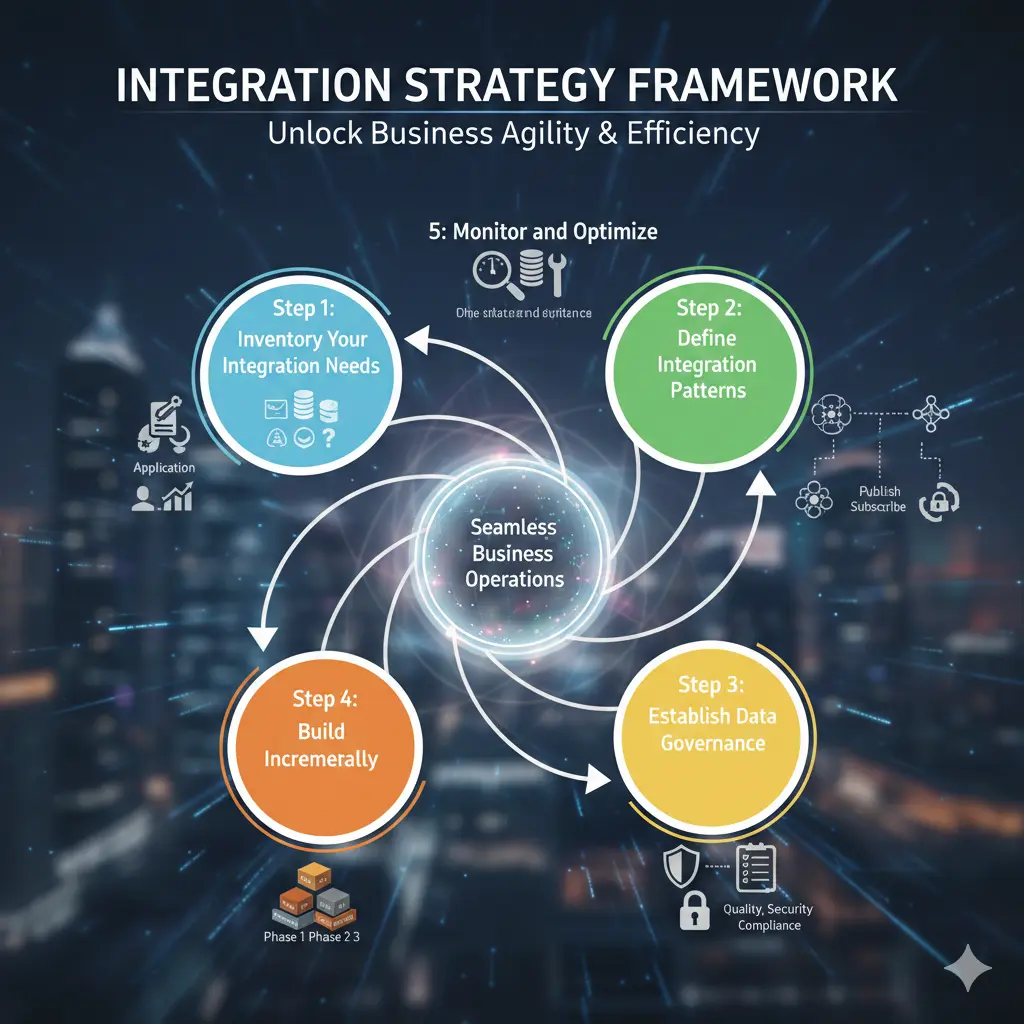
A structured approach to integration architecture and governance
Step 1: Inventory Your Integration Needs
Map out what actually needs to connect:
- List all business applications currently in use
- Identify which systems need to share data
- Document current integration methods (manual, CSV files, point-to-point APIs, etc.)
- Categorize by criticality and complexity
A professional services firm discovered they had 18 systems but only 12 active integrations—mostly manual CSV exports and imports happening weekly. This inventory revealed the true scope of their integration debt.
Step 2: Define Integration Patterns
Different integration needs require different patterns:
- Real-time sync: Changes in one system immediately reflected in others (customer updates, inventory changes)
- Batch processing: Data synchronized on a schedule (nightly reporting, weekly reconciliation)
- Event-driven: Specific events trigger integrations (new order → fulfillment workflow)
- Request-reply: One system queries another for information (product availability check)
Match patterns to business requirements. Real-time sync is powerful but complex. Batch processing is simpler but introduces delays. Choose appropriately.
Step 3: Establish Data Governance
Integration moves data between systems. You need rules:
- Master data management: Which system is the source of truth for each data type?
- Data quality rules: What validation happens before data is synchronized?
- Conflict resolution: What happens when the same record is updated in multiple systems simultaneously?
- Security and access: Who can build integrations? What data can be accessed?
🔐 Security Considerations
Integration platforms have access to data across multiple systems. Implement:
- Least-privilege access for integration accounts
- Encryption for data in transit and at rest
- Audit logging of all data access
- Regular security reviews of integration configurations
Step 4: Build Incrementally
Don't try to integrate everything simultaneously. Prioritize based on:
- Business impact: Which integrations eliminate the biggest pain points?
- Technical feasibility: Which systems have good APIs and are easier to integrate?
- Dependency chains: Which integrations enable other automation initiatives?
Start with 2-3 high-value integrations. Prove the approach. Build organizational capability. Then scale to more complex scenarios.
Step 5: Monitor and Optimize
Integration isn't "set and forget." Establish monitoring:
- Success/failure rates for each integration
- Data volume and processing times
- Error patterns and root causes
- API consumption and rate limit monitoring
- Performance trends over time
Set up alerts for failures and anomalies. Review integration health weekly. Optimize based on actual usage patterns.
Real-World Integration Transformation
A distribution company with 15 business systems and 23 manual integration processes (weekly CSV exports/imports, manual data entry, email-based notifications) implemented an integration strategy:
Month 1-2: Assessment and Planning
- Documented all 15 systems and 23 integration points
- Identified pain points and business impact
- Selected Workato as iPaaS platform based on requirements
- Established governance framework and standards
Month 3-4: Quick Wins
- Automated customer data sync between CRM and accounting (weekly manual → real-time)
- Integrated e-commerce orders with ERP and warehouse management (email notifications → automatic processing)
- Connected support tickets with CRM for customer context
Month 5-12: Systematic Integration
- Built 18 additional integrations following established patterns
- Eliminated all manual CSV processes
- Reduced data entry errors by 85%
- Enabled real-time inventory visibility across channels
Results After 12 Months:
- 21 active integrations (from 0 automated)
- 42 hours/week saved in manual data processing
- Order-to-fulfillment time reduced from 18 hours to 2 hours
- Data accuracy improved from 91% to 99.2%
- Enabled real-time reporting previously impossible with manual processes
- $280,000 annual savings from efficiency and error reduction
Common Integration Mistakes
⚠️ Integration Anti-Patterns
- Building before standardizing: Creating integrations without data governance creates inconsistency nightmares
- Over-complicating simple needs: Not every integration requires enterprise iPaaS—sometimes Zapier is enough
- Ignoring error handling: Happy-path integrations break in production when edge cases occur
- No monitoring: Silent failures mean problems aren't discovered until business impact occurs
- Insufficient documentation: Undocumented integrations become unmaintainable when the builder leaves
- Tight coupling: Integrations that assume specific system behaviors break when systems are upgraded
Integration Enables Everything Else
Here's why integration architecture matters for automation:
- Workflow automation requires moving data between systems
- Document processing extracts data that needs to update multiple systems
- Conversational AI needs to access and update records across applications
- Analytics and reporting require consolidated data from disparate sources
- Customer experience depends on consistent information across touchpoints
Every automation initiative eventually needs integration. Building solid integration foundations early makes every subsequent automation project faster, cheaper, and more reliable.
Looking Forward
Integration architecture isn't static. APIs evolve. New systems get added. Requirements change. The organizations that succeed treat integration as a strategic capability, not a tactical project.
They invest in iPaaS platforms that grow with them. They establish governance that balances speed with control. They build internal expertise in integration patterns and best practices. They monitor and optimize continuously.
Most importantly, they recognize that integration is the foundation that makes automation possible. Get the foundation right, and you can build impressive automation capabilities. Get it wrong, and you're forever struggling with disconnected systems and manual workarounds.
The choice is clear: invest in integration architecture now, or continue paying the integration tax—in manual effort, errors, and missed automation opportunities—forever.